A coding station succeeds only when the product arrives at the printhead at a known position, speed and distance. By following the detection, tracking, printing and discharge sequence, you can specify the right conveyor, printer, guides, controls and inspection points for your production line in Coimbatore.
Key takeaways
- Stabilise each product before it reaches the printhead.
- Match CIJ, TIJ or laser marking to the surface and line speed.
- Set print position from measured product spacing, not belt speed alone.
- Specify a dedicated conveyor when orientation and code inspection matter.
How the product moves from loading to printed-code discharge
Each product is loaded onto a moving belt, stabilised before the print point, marked without stopping, and discharged with its code facing the required inspection direction. That sequence defines inkjet printing conveyor operation.
- The operator places each product on the belt with enough spacing to prevent contact or overlapping print zones.
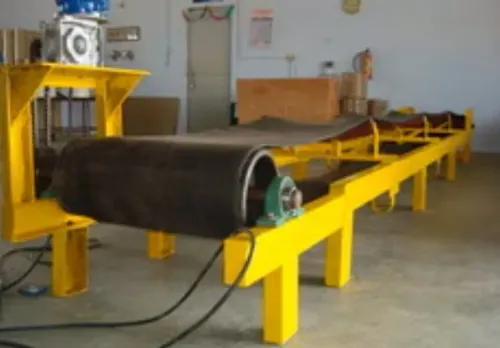
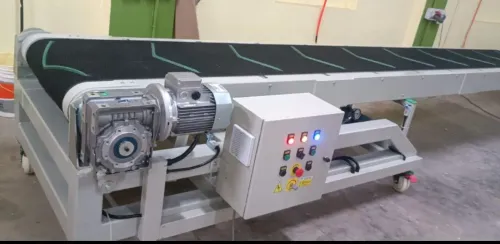
- The drive motor and gearbox move the belt at the selected speed. Side guides keep products from drifting or rotating.
- A photoelectric sensor detects the leading edge and starts the print sequence.
- An encoder reports belt movement, allowing the printer to calculate the product’s distance from detection to the print position.
- The printhead applies the code as the product passes. In CIJ, a pressurised ink stream breaks into droplets; charged droplets are deflected onto the surface, while unused ink returns through a gutter.
- The product continues through the post-print section for visual or camera inspection, then leaves the conveyor for packing or the next process.
The printer delay must represent travel distance, not only elapsed time. A fixed timer can shift the code when the belt accelerates, decelerates, or stops; encoder tracking preserves dot spacing and date-code placement.
Keep the printhead over a straight, stable belt section. A transfer gap, curve, vibration, or changing product height can stretch characters, create missing dots, or reduce barcode readability. A controlled discharge then separates acceptable products from those requiring rejection or rework.
What each conveyor and control component does
A complete coding station combines mechanical, sensing and control components to hold each product steady, detect it, track its travel and trigger the printhead at the correct point. The printer bracket must keep the head accessible and maintain a fixed gap above the product.
| Component | What it does | What failure looks like |
|---|---|---|
| Conveyor belt | Carries products at a controlled speed | Slippage or vibration stretches codes |
| Drive motor and gearbox | Supplies torque and sets belt speed | Speed variation shifts print position |
| Guide rails | Keep products laterally aligned | Skewed or unreadable codes |
| Top hold-down or flights | Prevent bouncing and tipping | Changing printhead distance |
| Photoelectric sensor | Detects the product’s leading edge | Missing or duplicated prints |
| Encoder | Reports actual belt travel | Incorrect delay during acceleration |
| Printer bracket | Positions and stabilises the printhead | Blurred or misplaced characters |
| Control panel | Links run, fault, speed and safety signals | Line runs without reliable print control |
The sensor starts the trigger sequence, while the encoder measures the distance to the print point. Set delay by distance, not time alone: travel distance divided by belt speed must include printer response time.
A conveyor system for coding products in Coimbatore still needs printer-ready, conveyor-running, low-ink, fault and emergency-stop signals. Risk-assess the emergency-stop circuit separately from printer software, and provide straight belt before and after the head for stabilisation and inspection.
How CIJ, TIJ and laser marking behave on a moving line
Choose the technology by matching the product surface, code durability and verified line speed—not by choosing the fastest printer on paper. An inkjet conveyor for production lines must keep each item at a repeatable printhead distance while the encoder preserves dot spacing during speed changes.
| Option | Product and code fit | Moving-line behaviour |
|---|---|---|
| CIJ | Uneven, curved or porous surfaces; dates, batch codes and barcodes using the correct ink chemistry | Pressurised ink forms droplets; charged droplets deflect onto the product while unused ink returns through the gutter. It suits high-speed, continuous lines and non-contact printing. |
| TIJ | Flat, clean surfaces; sharp text, 2D codes and small graphics | A thermal cartridge ejects ink close to the surface. It delivers high resolution with little mess, but cartridge capacity, throw distance and ink compatibility limit the application. |
| Laser | Compatible plastic, metal, glass or coated material; permanent traceability codes | Removes or changes the surface to create contrast, so there is no ink or solvent supply. Marking speed, fumes, heat effect and required guarding depend on the laser and substrate. |
Use CIJ when the product shape or speed makes close-head printing unreliable. Select TIJ when print quality and clean changeovers matter more than long throw distance. Select laser when a permanent, consumable-free mark justifies extraction equipment and enclosure costs.
Test the exact product, code size and belt speed together. A photocell alone cannot correct acceleration; use encoder tracking, then confirm barcode grading and position at the slowest and fastest operating speeds.
How to set the print position, speed and product support
Set the printhead only after the product travels steadily on a straight section. A transfer, curve, belt gap or vibrating frame changes the product-to-nozzle distance and produces blurred, shifted or incomplete codes.
1. Place a photoelectric sensor upstream of the print location and measure the distance between them. Enter that distance, not just a timer value, as the print delay. The actual delay combines travel distance divided by belt speed with printer and control response time.
2. Fit the encoder to the conveyor drive or belt shaft. The sensor tells the printer that a product arrived; the encoder tells it how far the product moved. This preserves dot spacing during acceleration, deceleration and intermittent running, while a fixed timer can stretch or shift the code.
3. Support the product at the print point with a flat belt, side guides or a controlled top hold-down. Adjust guides to stop lateral movement without squeezing containers. Reject a product that rocks, rolls, tips or changes nozzle distance; reliable printing starts with reliable presentation.
4. Set belt speed against character height, font and resolution, then run the fastest planned product. Inspect small text, date codes and barcode edges for missing dots, compressed characters and loss of readability. Increase firing frequency, reduce character height or slow the belt when any defect appears.
5. Test every product size, mass, surface and ink combination through loading, printing and discharge. This is how inkjet printing conveyor for system works in coimbatore in practice: the application, not the location, determines whether the conveyor carries each item reliably.
When a dedicated printing conveyor is worth specifying in Tamil Nadu
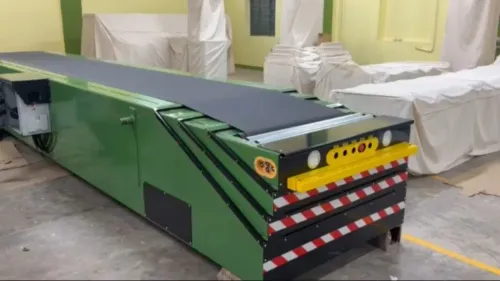
Specify the extra conveyor when an existing line cannot hold the product steady, expose the correct face, or preserve the required code position. The added transfer point is justified by fewer rejected packs, simpler printer adjustment, and reliable inspection.
Dedicated printing conveyor equipment in Tamil Nadu earns its cost when you need:
- Repeatable spacing for cartons, pouches, bottles, or packs that arrive touching or skewed.
- A straight, stable section long enough to settle the product before printing and verify the code afterward.
- Controlled access to the printhead, ink and solvent containers, with drip containment away from the product path.
- Encoder-based tracking because the line accelerates, decelerates, or stops; specify delay as detection-to-print distance, not time alone.
Do not specify a separate unit merely because the installation is in Coimbatore. A conveyor system for coding products is selected from product dimensions, mass, surface, speed, ink chemistry and cleaning conditions. Check the enclosure, sensors, motor, cable entries and controls against dust, humidity and solvent exposure.
An IP rating describes ingress protection; it does not prove chemical compatibility or high-pressure washdown suitability.
Ask Integrated Conveyors And Pacline Automation Technologies to show the transfer, guide-rail and printhead-access details on the layout, not only the belt length. If your current conveyor already provides stable tracking, a clear print zone and safe maintenance access, improving that section may cost less than adding another transfer.
Related products
 | PRINTING CONVEYOR The Inkjet Printing Conveyor is a precision-built conveyor system designed to work seamlessly with batch coding, labeling, and inkjet printing... View product → |
 | CONVEYOR The 1.3 Meter Inkjet Printing Conveyor is designed for smooth and accurate movement of products during batch coding, date printing, MRP printing,... View product → |
Frequently asked questions
How does an inkjet printing conveyor system move products through coding?
Products are loaded onto the belt, separated and stabilised, marked while moving past the printhead, then discharged with the code facing the inspection direction.
What do the main conveyor and control components do?
The belt moves products, guides and side rails maintain position, sensors trigger printing, the controller coordinates timing, and the discharge section transfers coded products to the next process.
How do CIJ, TIJ and laser marking differ on a moving line?
CIJ prints non-contact codes on many product surfaces, TIJ suits clean inkjet printing on compatible surfaces, and laser marking creates a permanent mark without ink when the material and safety controls are suitable.
When is a dedicated printing conveyor worth specifying in Tamil Nadu?
Specify one when products need repeatable spacing, fixed orientation, controlled print distance or reliable code inspection that an existing production conveyor cannot maintain.
Related products
 | PRINTING INKJET PRINTING 1300MM L CONVEYOR The Inkjet Printing Conveyor is designed to provide stable, vibration-free movement of products for accurate date, batch, MRP, QR code, and barcode... View product → |
 | CONVEYOR MS Inkjet Printing Conveyor is a precision material handling system designed for smooth and vibration-free movement of products during batch coding,... View product → |
 | Conveyor Inkjet Printing Conveyor is specially designed to support accurate and stable product movement for inkjet coding and marking applications. View product → |
 | CONVEYOR The 1.2-meter Inkjet Printing Conveyor is a compact, high-precision solution designed for smooth and consistent product movement during batch coding... View product → |
Keywords